
This document provides a summary of some of the work the TrackOne Studio development team have worked on recently. We have tried to include only those that are of interest to the majority of schools. Minor changes, or custom development affecting only a single school, have not been included.
New developments and improvements:
Configuration Settings
Continuous Period Integration
Added support for combined term/semester classes and flagged previous enrolment subjects in results across Student Results, Subject Results, and Cohort Results screens.
Custom Schema Result Maps (Admin > Analytics > Custom)
Added new screen for custom schema schools to manage result maps in the front‑end.
LMS Schools – Markbook Exports
Added option in Admin > Config > Continuous > Left Students to export fractional results with or without denominators.
Student Transcript – Previous Subject Results
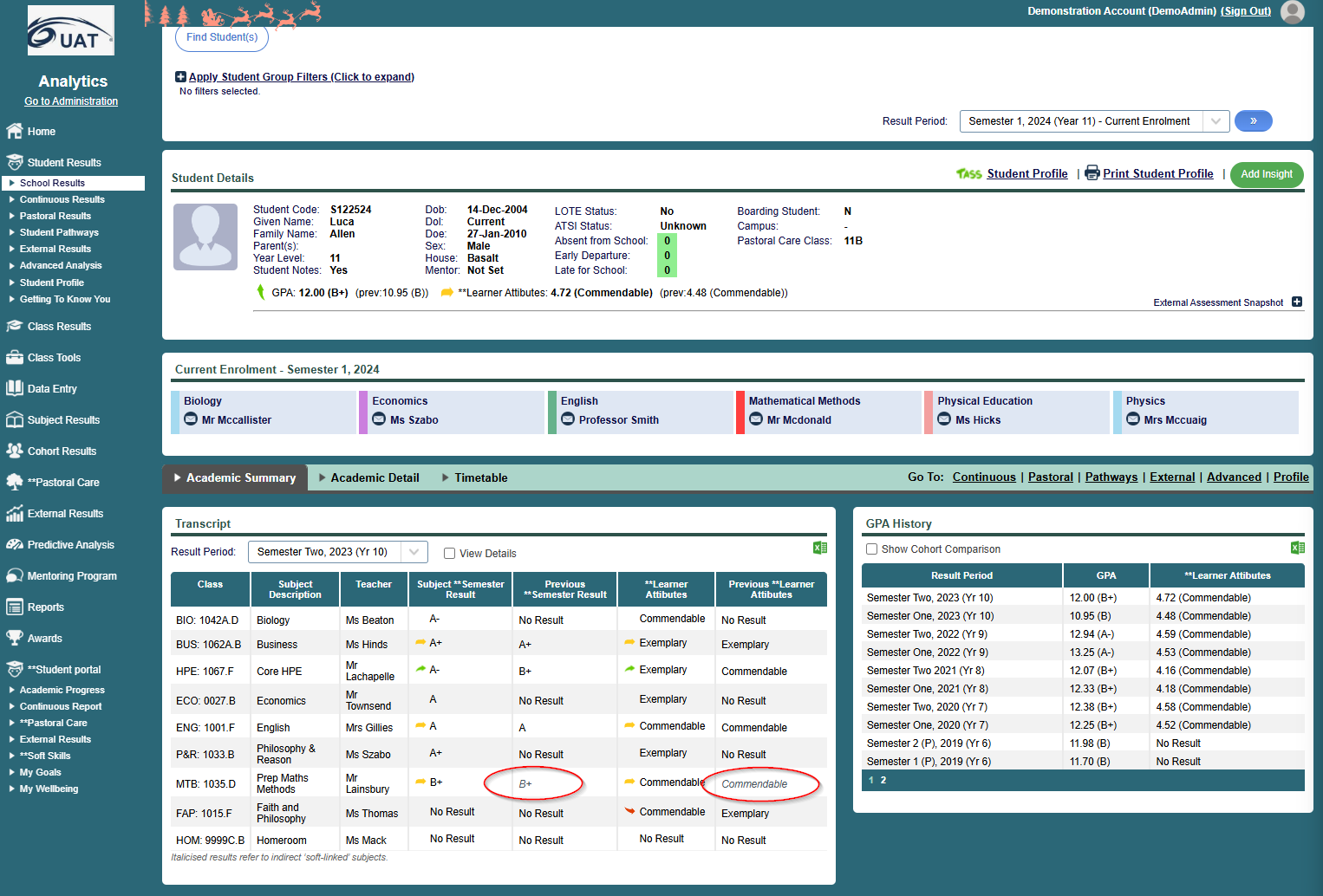
Added option in Configuration > Application > Activate Features and Display Options that allows soft‑linked subjects to display in Student Results > School Results. Soft-linked subjects will display in grey, italicised font.
Subject Leaders
In Analytics > Subject Results > Subject Leaders, averages now include all subjects a student studied across the year, whether taken in Semester 1, Semester 2, or full‑year.
Department Colours
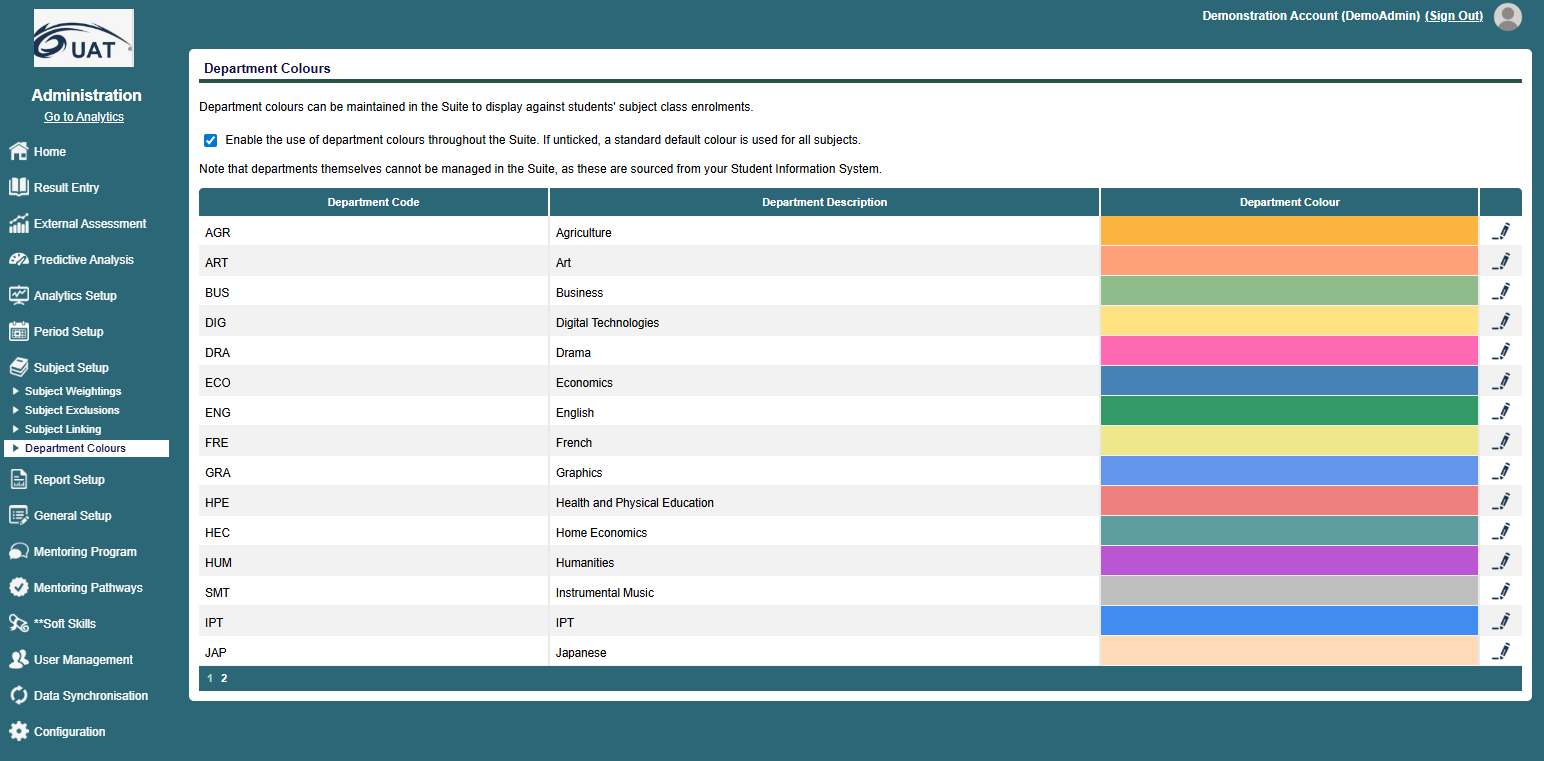
Added new maintenance screen in Admin > Subject Setup > Department Colours allowing schools to set colours against departments in their SIS (enabled for all SISs except SEQTA).
Year Level Start
Added new option in Admin > Configuration > Year Levels to set the lowest student year level displayed in the Suite. Administrators can select a year level from a drop‑down (or leave blank to show all), ensuring classes and students below the chosen level are excluded.
Reverse Chart Axis
Added new checkbox in Configuration > Application > Activate Features and Display Options to reverse x and y axes on distribution charts.
Markbook Pastoral Terminology
Added new option in Admin > Config > Continuous > Continuous Period Terminology for LMS schools to set the title used in the pastoral results section of Markbooks (e.g. “Learning Attributes”). This entry displays in Class Markbook, Student Markbook, Continuous Results, and Exports.
Unknown Result Display
Moved the setting for unknown result override from Config > Application > Activate Features and Display Options to Admin > Config > Continuous > Pastoral Terminology for easier access. Schools can enter custom text (max 10 characters) to display for unknown results in Markbooks.
Reportable Subjects Display (TASS Schools)
In Admin > Configuration > Application > Activate Features and Display Options > Display Options, added a new setting to control whether only subjects flagged as reportable show in the Suite. If unticked, all subjects display.
Graph Scaling
Graphs now scale to the browser window size across all areas of the Suite where charts are generated (e.g. Analytics > School Results > Student > GPA History Chart).
External Assessment Results – ‘All’ Options
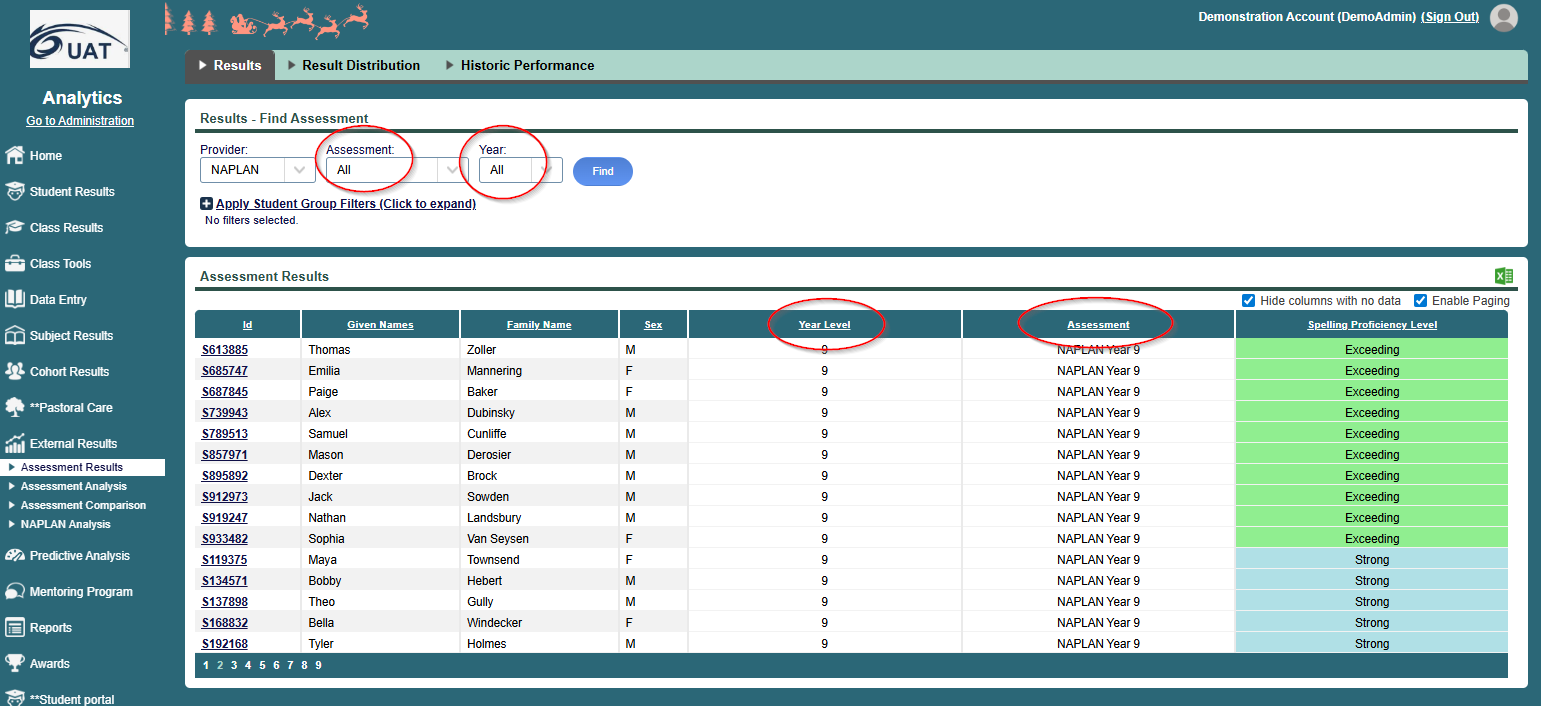
In Analytics > External Results > Assessment Results, added ‘All’ options in the Assessment and Year dropdowns. This allows schools to view results across all assessments from a provider and/or all year levels. When selected, only the most recent results display per student, with two new columns showing Year Level Assessment and Assessment Year Level as appropriate.
SIS/LMS Synchronisation
Edumate – Welfare Incidents Sync
Enhanced welfare incident synchronization to include records older than one year and incidents with no recorded outcomes.
Schoolbox v25.0
- Sync logic will automatically detect Schoolbox version by checking for new columns.
- This ensures compatibility with both v24.0 and v25.0 installs.
Schoolbox Sync – Work Type Configuration
Summative and pastoral work type setup has moved into the Schoolbox configuration screen in Administration > Data Synchronisation > Schoolbox Sync Setup, giving schools front‑end control instead of relying on hardcoded settings.
- Administrators can now select which work types to count as Summative Assessment Work Type(s) (e.g. exams, projects) and which to count as Pastoral Assessment Work Type(s) (e.g. non‑academic tasks) using multiple checkboxes.
- Summative work types display on markbooks as the academic tasks used to calculate a student’s overall subject result.
- Pastoral work types display separately on markbooks under the configured pastoral/non‑academic section label.
- The Schoolbox Sync Program reads these defined work types to determine which assessments to sync as summative or pastoral.
Batched Syncing
Introduced batched syncing across multiple data points to improve overall sync performance and reduce errors. This enhancement ensures faster, more reliable synchronization by processing data in grouped batches rather than individual records.
Schoolbox Automatic Synchronisation
Automatic synchronisation has been enabled so that any school wishing to use it now can. When Automatic Synchronisation is selected, results will automatically push to the SIS at the end of a schedule Schoolbox sync.
- Two modes are available:
- Automatic Synchronisation – results sync continually with moderation controls.
- Automatic Synchronisation (Bypass Markbook) – direct sync from LMS to SIS without markbook modifications or moderation (use only if advised by TrackOne staff).
- For non‑Schoolbox LMSs, auto sync options remain hidden.
Synergetic – Enrolment Date Filtering
Synergetic schools using Schoolbox or Canvas can now filter markbooks by enrolment dates, matching functionality already available for TASS schools.
SEQTA – Roll Group
Student Roll Group data from Seqta now imports into TrackOne as a user field, allowing reports to be filtered by Roll Group